Wallworm Gaming
Installing the New Patch over the Old Patch
So EA made an error when they told everyone there would not be a different patch after the beta 2 version. So now you have to mess with the registry to do it.
- Deleete the old patch out of your downloads or desktop if you still have it.
- Download these two files:
Patch 1.51 (1.95 GB)
WinMD5.exe
DO NOT USE THE 1.50 PATCH FROM EA DOWNLOAD MANAGER. DOWNLOAD THESE INSTEAD. - Open WinMD5.exe. This program lets you make sure that the other files downloaded without any errors. Drag the patches onto the WinMD5 window and make sure the checksums match the following:
BF2142_Patch_1.51.exe 155a78aa49d779abb87e87eb3eea1d0e
If they don't match, try downloading the file again. - Open up the Registry Editor (Start->Run, type in regedit and hit enter)
- Seatch for Battlefield 2142. You may have to hit next a few time. Eventually you will see something that looks like this:
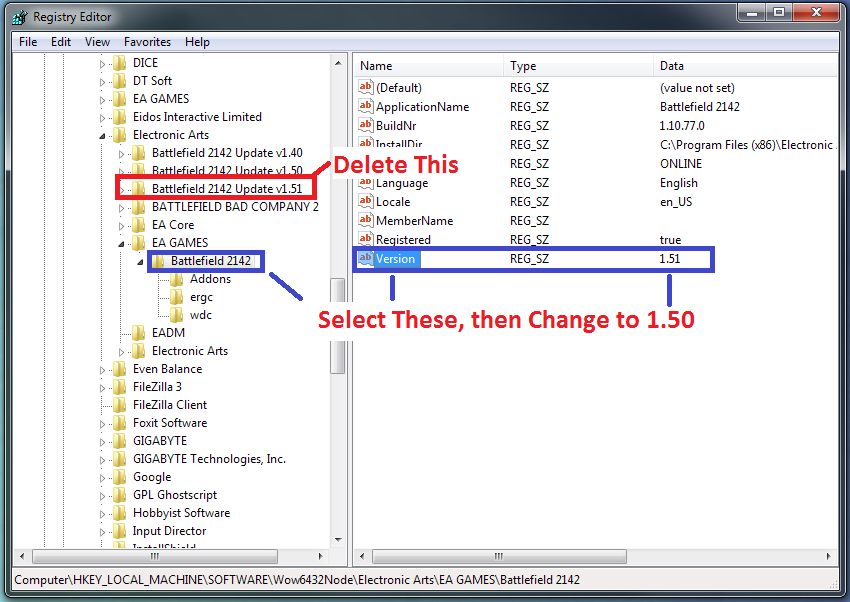
- Delete the Key labeled "Battlefield 2142 Update v1.51"
- Change the value of the Version Key to 1.50. You have now tricked the computer into thinking you have version 1.50 of the game.
- Turn off antivirus. It can interfere with the new patch installing.
- Install the 1.51 Patch
- Load up Battlefield 2142. If you hit Alt-Tab the version on the taskbar will be 1.10.112.0.
- Knife AndraX2000 in the Hotel.
Wallworm Gaming. We've got your back.